Blue Yeti Pro Mic Review
 I own the Yeti AND the Yeti Pro. Yes both microphones. Why? They serve different purposes. If you want to read the Yeti review, you can find it here: http://techiefather.com/reviews/yeti-blue-mic-review
Yeti Pro – How it differs
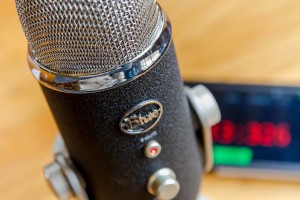
How does the Yeti Pro differ from the Yeti? The main difference is the interfaces that the Pro has. The Pro has the familiar USB interface, but it has been upgraded. Inside the mic itself, the A-D converter is now 24-bit/192khz sampling. This is far higher quality than what’s known as “standard CD quality.”
But that’s not the only difference. The Yeti Pro also has XLR outputs for interfacing with professional sound equipment. This is the reason that I purchased the Yeti Pro, to connect to my mixer. My main purpose is to use it to record video. This means that I will have it hooked up to my mixer, then to my camcorder, which has an audio input.
Why do I have both?
If the Yeti Pro is better than the Yeti, why do I still have the Yeti? Because the Yeti does not require a driver to work. The Yeti Pro requires a driver to be loaded on a pc or a mac to work. That means if I want to hook it up to someone’s laptop, I have to be sure to have the driver as well. Not great. So the Yeti is simpler and easier. But yet the Yeti Pro can interface with my sound equipment and video equipment.
 How’s the quality?

Both the Yeti and Yeti Pro sound terrific. These are the two mics that I use on a regular basis nowadays, now that I got rid of most of the other mics that I had. This included Audio-Technica 4040’s, 4033’s, various Shure mics, and others. I do far less professional sound nowadays, and these fit the bill with top notch sound.
What are common uses?
The most common use for these two mics is podcasting. But I don’t do any podcasting. I use them for vocal recording, room recording (concerts), video recording, and anything else I need great quality sound. In fact, I used the Yeti, plugged into my Galaxy Note 2 phone to use as a field recorder. It worked just fine, and I had exactly what I was looking for.
Field Recorder
 Here’s how to use the Galaxy smartphone as a field recorder.
Galaxy Note 2 (or other android phone)
I’m sure there are plenty of phones that would work in this mode, but I’ve only tested it on my Note 2, and my wife’s S3, both with the Yeti and Yeti Pro. The USB Audio Recorder app has a list of tested configurations that work. Be sure to visit their page before assuming it works. Or you can also download their trial version to see if it works with your phone / microphone combination.