5 reasons I chose a Dell M4800 over the Apple MacBook Pro
 I was in the market for a new laptop to replace my aging 3.5 year old machine. This “old” machine, a Dell Latitude E6510, was no slouch. It had a Quad Core processor (core i7-720qm), along with a 500GB SSD hard drive, and a 500GB Hybrid hard drive, 16GB RAM, separate video graphics processor (nvidia NVS 3100M), a 1920x1080p display screen, and much more. This laptop will go to my wife, and her’s will go to my daughter.
There are 2 main reasons that I am replacing this laptop. The first is photo processing. I take about 15,000 photos each year, and this year it’s a bit higher, maybe 18,000. This is because I shoot a lot of houses for other agents. I have shot about 120 houses this year so far, and each house I typically shoot 60-90 photos. You can see that it adds up fast. This alone is about 9,000 photos.
Processing these photos on my old E6510 was getting to be a pain. I run Lightroom 5.2, and importing a set of 75 photos takes a while. Well, not the importing, but the rendering of the previews. Then the export of the files also is taking a while. On the days that I am shooting 3 or 4 houses per day, the export process slows down the computer too much to do any editing of any other photos.
The second reason is that I also edit videos on my laptop. For each house I shoot, this includes a video render for the video slideshow. Then I also resize the video flies so that they stream on the web just fine. (sample: http://www.minneapolisvirtualtour.com/tour1 ) This resize takes a bit of computing power.
Evaluation of current generation laptops
I am typically a PC person, and have been for many years. I have used Macs in the past and am not opposed to them. So I decided to consider a Mac and compare it to what I would normally purchase, a Dell. I needed each one to be a quad-core processor, and have a separate video graphics processor, preferably one that supports CUDA (which would be nvidia), and secondarily OpenGL 4.3. The reason for having CUDA support is so that the video rendering process can also be offloaded to the graphics processor. My software, Sony Movie Studio, can take advantage of CUDA support to significantly increase rendering speed.
Minimum Specs for me
Quad-core Core i7
Separate graphics card
At least a 1080p display
1TB of hard drive space
3-year warranty
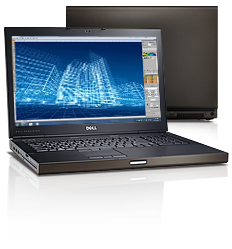
The Dell Precision M4800 15.6″
The Dell Precision line is the next higher model up from the Latitude E-series that I had previously. It has impressive specs. I was looking at both the Latitude E6540, and the Precision M4800, and basically it came down to price. Dell had the M4800 for 30% off, and I had a 20% stackable coupon. This put the M4800 at almost the same price as the equivalent Latitude, otherwise I wouldn’t have spent the extra money on the M4800.
As far as the specs go, here’s what I looked at:
i7-4800QM 2.8Ghz quad core with 3.8ghz turbo
8GB RAM (expandable to 32GB)
750GB 7200 rpm hard drive
3 hard drive capable
Nvidia K2100M
Display 3200×1800
4 monitor capable
3-year in home warranty included
DVD included
VGA/HDMI/DP connectivity included
Since this laptop has 4 SIMM slots, I would expand the 8GB to 16GB right away. That would eat up all 4 slots, but I can always change them out later and bump the machine up to 32GB.
I also would pull my existing 500GB SSD drive and make that the primary drive in the new laptop, moving the 750GB drive to secondary status. I would clone the 750GB drive down to the 500GB drive, leaving both as bootable. This would leave me with 2 bootable drives, both with the OS and apps installed on both of them. The rest of the space ont he 750GB drive would be for exporting photos and videos, exactly how I do it now.
I always get the 3-year in-home warranty for the sole fact that laptops do break. When something goes wrong, I need to have the capability of having them come to my place of work (or home) to fix my computer. I cannot send it out for 2 weeks while its being repaired. Dell offers this service on most of their computers.
The MacBook Pro 15.4″ Retina Display
The MBP15 is the most equivalent I could find to the Dell. I’ll highlight the differences
 i7-4960HQ 2.6ghz quad core with 3.6ghz turbo
16GB RAM
No memory expansion possible
512GB SSD hard drive
No other drives possible– I’m stuck with only 500GB of capacity
GeForce GT750M about 6% faster than the K2100M
Display 2880×1800 lower resolution
Can drive 3 monitors instead of 4
3-year carry in warranty +349 No in home warranty possible
VGA adapter +29
external DVD +79
I had to add a few options to match that of the Dell, notably the warranty, the VGA adapter, and the external DVD.
The CPU is a slight bit slower than the i7-4800MQ processor, but I think Apple chose this processor for the better integrated graphics. The integrated graphics in the i7-4960HQ appears to be a bit better than the i7-4800MQ. But since I won’t be using either integrated graphics, that shouldn’t matter much.
There are two things that really suprise me with the MBP. The first is the 16GB maximum memory. Why push this as a photographer’s computer or a videographer’s computer? 16GB isn’t enough, or rather, it isn’t enough for 3 years from now.
The second thing is the lack of hard drive options. With the Dell, I can have 2x 2.5mm laptop hard drives, along with a mSata SSD hard drive. That’s 3 drives in total. The MBP can only support 1 drive. Yes, you can upgrade it to a 1TB SSD drive, but you can put 2 of those in the Dell, along with 1 mSata drive. That means I can get 2.5TB of hard drive space in the Dell.
Bottom Line
The Dell came down to a total of 1668.48 before tax and shipping. Dell almost always has free shipping.
The MBP came down to a total of $3285 before tax. That’s almost exactly twice the price! What really gets me is that at twice the price, I don’t get as much of a computer.
The main differences:
- Twice the price.
- I’m limited to 16GB of RAM, which my 3 year old computer already has.
- I get a lower resolution display.
- I DON’T get an in-home warranty, just carry-in support.
- I don’t get VGA connectivity built-in. There are still many projectors out there that have the VGA connector on them.
With all of that, I’ll be the first to say that I ordered the Dell, which will have more capacity than the MBP at half the cost. I know people will say that OSX is better, or that Mac is better, or that the support is better. But it all boils down to usability and price. I am getting a far more usable computer for far less dollars.
=================================================
Update as of December 2015:
The computer is now 2 years old, and it still is my daily driver. I have not had any problems to speak of, and have not even used the warranty (except for the broken screen on delivery). The battery was giving out, but I bought the extended battery warranty and had them ship me a new battery. I have no lockups or crashes… ever. I am now running Windows 10, and the machine is flying faster than before. I use this machine heavily every single day, and it still performs just fine. My only complaint is that the hinge for the display creaks when I move it up and down, but that’s no big deal AND I could probably have Dell come out and fix it.
=================================================
Update as of May 2019:
The computer is now about 5.5 years old and it is still my daily driver. I have not had any hardware problems since the last time I wrote. Nothing. It just runs every day. It is a tiny bit slower, but it still is wholly adequate for my needs today, which include Lightroom, Photoshop, and Sony Movie Studio Premium, and Fortnite. Fortnite only runs at 30fps at 1920×1080 due to the old graphics card.
I consistently run 50 chrome tabs, with lightroom and excel, every day just fine. The battery is 4 years old and only lasting about 1.5 hours max, but that’s to be expected with an old battery.
I did break a key on the keyboard and bought a new keyboard from amazon for about $20, since the computer is now out of warranty (3 year warranty). No other problems to report at all. Windows 10 does crash on this computer about 1x per month which requires a restart. But I attribute that to Windows 10, not hardware since that goes away for a while, and comes back after some Windows updates.
Recommendations after 5.5 years:
The battery warranty ($69ish) was worth it since I use my computer heavily and replaced the battery once with that warranty. The 3 year in-home service warranty was worth the peace of mind ($included) even though I didn’t use it on this computer. This machine has been running like a champ for 5.5 years now, and is still wholly reliable, and speedy.
Current configuration:
Upgraded to 24GB of RAM
Upgraded to 480GB SSD primary hard drive
Upgraded to 2TB secondary hard drive
I could still put another 2TB in the CD bay, and upgrade the SSD to 1TB, and add 8 more GB of RAM.
Prior computer:
My wife is still using my older Latitude E6510 which is now about 9 years old, and it’s still wholly adequate for her. I don’t remember the processor in that computer, but it was a quad-core i7 of some sort. It currently has a 480 SSD primary drive, and a 1TB secondary drive, and no CD drive since the 1TB takes that cd space. She has an external dvd drive that she uses occasionally. It also is running 16GB of ram. That machine has also given us no problems outside of warranty, which ended 6 years ago.
Prior-Prior computer:
The prior-prior computer for me was a Dell Inspiron 6400. This was the computer that my wife was using that I migrated to my daughter. It’s probably 12 years old as of now. This computer is not surviving well. My daughter dropped it a couple times and it has a cracked case in 2 spots. It also runs very slow, probably due to the limited memory (probably 2GB) and processor speed (probably a core-duo) now. We do not use this computer any more. But it does boot up and run Windows so it is still functional.